SSK SD601 2TB: A Tiny USB-C SSD Without the Cable
The SSK SD601 puts 2TB in a direct-plug USB-C drive. Here is where its compact design makes sense, and what to check before using it for iPhone video.
Quick Take
- A direct USB-C connector makes this a compact option for carrying files between a phone, tablet, and laptop.
- Its up-to-1050MB/s rating is not a sustained-write guarantee. Check your recording requirements before buying it for ProRes.
The SSK SD601 2TB is worth a look if the cable is the part you dislike about portable SSDs. Its USB-C connector plugs straight into a compatible device, so carrying extra storage does not also mean packing a short cable or finding somewhere for a drive to dangle.
That is the appeal here: a little drive for a travel photo folder, large video files, or moving work between a phone and a laptop. It is not a reason to replace a portable SSD you already like. We have not tested the SD601; this is a buying guide based on its listed specifications.
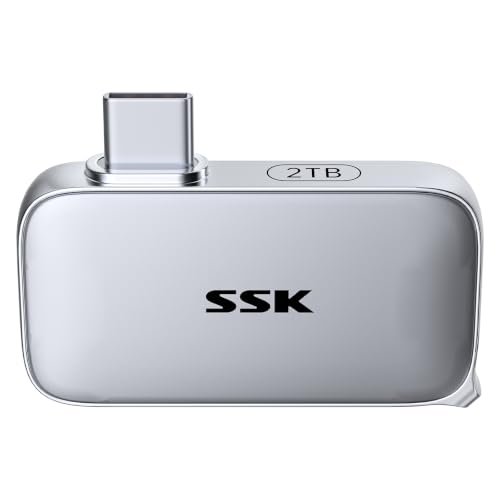
Small enough to keep with your everyday kit
SSK lists the SD601 at 46 x 25 x 9mm. The broad, flat body sits beside the connector rather than at the end of a long thumb-drive housing. There is also an angled adapter in the package, useful when the straight connection puts the drive where you do not want it.
Check the fit with your phone case and neighboring laptop ports. A built-in connector is convenient only when the body has room to sit properly; do not force it into a recessed port or leave it sticking out while a laptop goes into a bag.
This is the SD601, not one of SSK's similarly named dual-ended USB-A/USB-C sticks. If your travel laptop only has USB-A, that distinction matters. The point of this model is direct USB-C use.
Treat 1050MB/s as a peak, not a promise
The SD601 has a 10Gbps connection and a claimed speed of up to 1050MB/s. Your device, port, workload, and file sizes still determine what you see. Having a USB-C socket does not by itself mean the host supports that transfer speed.
SSK separately lists sustained writes around 330–340MB/s after 800GB of writing. That is a manufacturer claim, not our benchmark, but it is the more useful number when you are thinking about long recordings or huge transfers. Do not read the headline speed as a guarantee that every copy will run at a gigabyte per second.
Buying it for iPhone video? Check the recording mode
Moving existing files to an SSD and recording ProRes directly onto one are different jobs. The SD601 is listed as exFAT-formatted, but a compatible format alone does not prove that a drive will sustain your chosen recording mode.
Apple's external ProRes requirements include sustained writes of at least 220MB/s for 4K60, or 440MB/s for 4K120 on supported iPhones, with a maximum power draw of 4.5W. The SD601's stated long-write figure is below that 4K120 threshold. Its peak rating is not a sound basis for recommending it for that mode.
For 4K60, the claimed write figure clears the speed requirement, but we have not verified its power draw or recording stability. Test your exact phone, adapter, and recording settings before relying on it for footage you cannot repeat.
Rugged storage is still not a second copy
SSK rates the aluminum-bodied SD601 for IP65 dust and water resistance and 2m drops. Those are useful travel specifications, not permission to submerge it or a guarantee that a knocked connector will survive.
Keep important footage in two places until you can make a proper backup. A small SSD is easy to pack, but it is also easy to misplace; moving the only copy from your phone to it does not create a backup.
Buy the SD601 for a compact, cable-free way to carry files. If you are choosing between tiny direct-connect drives, our SSK SD601 vs Lexar Professional Go comparison covers the more useful differences. For other shapes and storage types, see the portable storage guide for travel and iPhone creators.
Affiliate disclosure: We may earn a commission if you buy through our links at no extra cost to you.