Olight Oclip 2 Ultra: A Clip Light You Can Finally Aim
Olight's Oclip 2 Ultra adds a tilting head, rotating clip, four light sources, and two charging options to a compact hands-free flashlight.
Quick Take
- The tilting head and rotating clip are the real upgrade, because you can aim the beam after clipping or mounting the light.
- Flood, spot, red, and UV modes make the Ultra unusually versatile, but the cheaper Oclip 2 Pro is enough if you do not need UV.
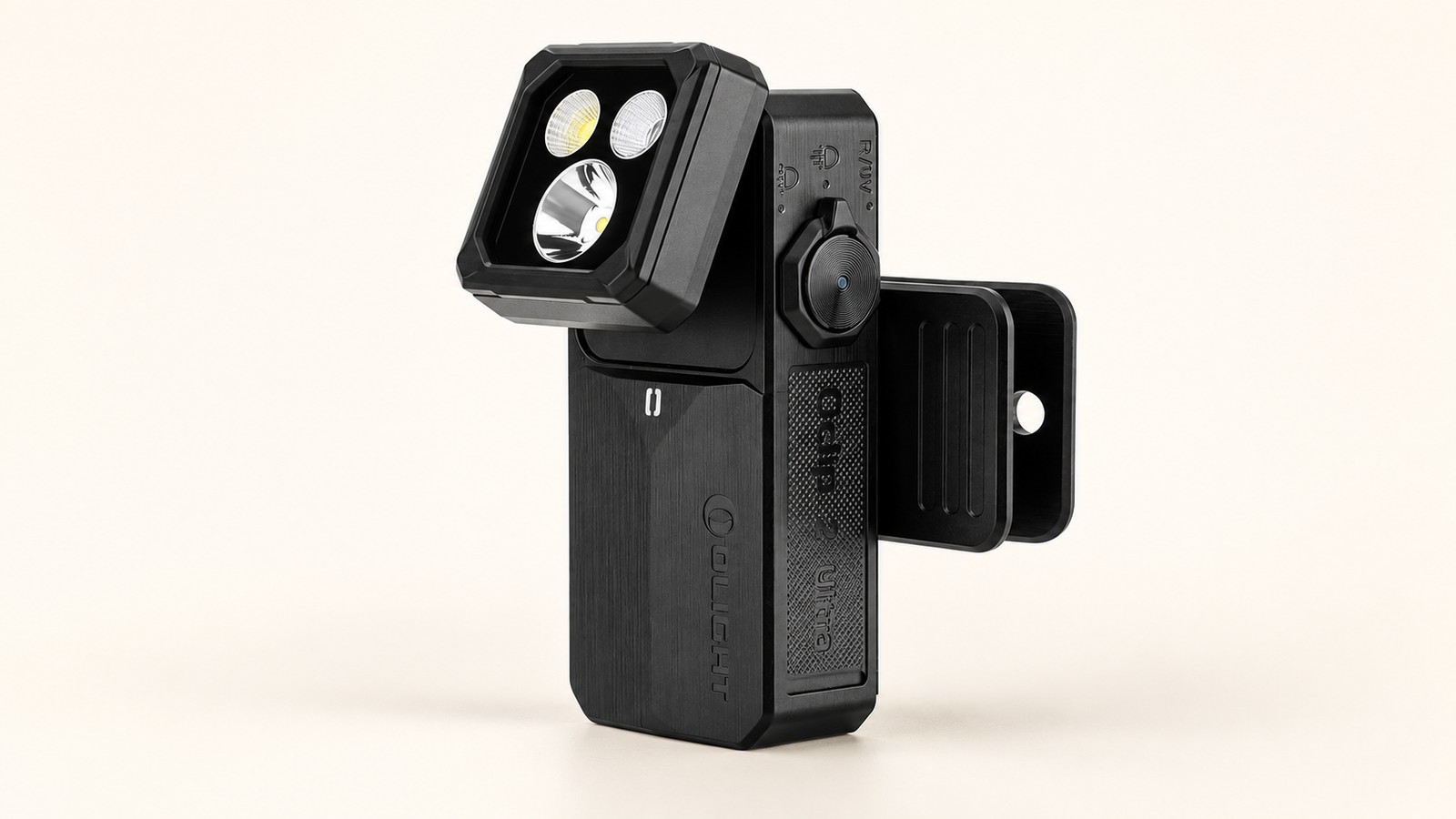
The Olight Oclip 2 Ultra is the clip light I would buy for maximum versatility. It combines a 580-lumen floodlight, a 450-lumen spotlight, red light, and UV in a body that can clip to a strap, hang from a hook, or stick to steel.
The important upgrade is not another few lumens. The light head now tilts through 115 degrees while the clip rotates through 360 degrees. That solves the basic problem with most clip lights: the thing you clip them to rarely points in exactly the direction you need.
The New Hinge Is the Best Feature
The original Oclip design was easy to carry, but aiming it meant repositioning the entire light or finding a better mounting point. The Oclip 2 Ultra separates those jobs. First attach the clip or either magnet, then rotate and tilt the light toward your work area.
That is useful on a backpack strap, cap brim, tent loop, steel tool chest, or under a car hood. The clip accepts material up to 14mm thick, and its hanging hole gives you one more option when there is nothing suitable to grip. Olight says both adjustment mechanisms passed 10,000-cycle durability tests.
Four Useful Light Sources
The Ultra's lighting modes cover four distinct jobs:
- Floodlight: up to 580 lumens for a broad work area or campsite
- Spotlight: up to 450 lumens with a 130-meter throw
- Red light: 4 or 40 lumens, plus a flashing mode, for preserving night vision or signaling
- UV light: 300 or 800mW for checking documents, stains, and fluorescent materials
Flood and spot each have five steady brightness levels from a 1-lumen moonlight mode to Turbo, plus strobe and beacon modes. The rotary selector chooses the light source; the side button controls output. That is easier to understand than hiding every mode behind a single button sequence.
The output figures and operating modes come from Olight's Oclip 2 Ultra product page and the authorized-retailer specification listing.
Charging Is More Flexible Too
The light charges directly over USB-C or through Olight's MCC magnetic system. The optional 1,000mAh Mobile Charging Dock can top up the light and roughly double its total runtime. A display on the dock shows the remaining charge for either the dock or flashlight.
That dock is convenient, not essential. The standard Oclip 2 Ultra already includes direct USB-C charging, so you do not need another accessory for normal use. Buy the Premium bundle if this will live in a work bag or travel kit and you want the extra reserve.
Small, but Not Featherweight
The Oclip 2 Ultra measures 60.2 × 28 × 35mm and weighs 79.5g, or 2.8 ounces. It is still compact, but its aluminum construction and dual-axis hardware make it heavier than a basic plastic clip light.
The tradeoff buys real durability. Olight rates it for IP66 dust and water resistance and a 2-meter drop. That is appropriate for rain, dusty campsites, and workshop use, though IP66 does not mean it should be submerged.
Should You Buy the Oclip 2 Ultra?
Buy it if you want one small light that can cover close-up work, longer-range spotting, red-light use, and UV inspection. The movable head makes those modes substantially more useful because the beam can be aimed without moving the mount.
Skip the Ultra if UV is unlikely to leave the novelty stage. The Oclip 2 Pro keeps the same rotating clip, tilting head, red light, dual charging, and ruggedness for less money. It gives up UV and a little output, but not the design feature that makes this generation better.
See our Oclip 2 Ultra vs Oclip 2 Pro comparison for the exact differences.
Affiliate disclosure: We may earn a commission if you buy through our links at no extra cost to you.